01 Introduction
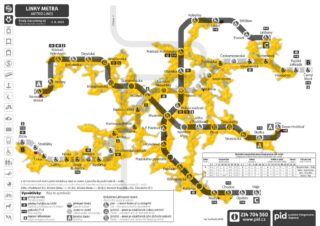
The aim of this project is to explore the intersection of urban infrastructure and biological growth through a generative simulation inspired by Physarum polycephalum. The visual and logical foundation of the project is the Prague Metro network map, which acts as the environment for the digital organism to grow. The goal is to move beyond static, geometric mapping and instead create an adaptive, organic network that simulates the living process of connecting significant urban hubs. The project also suggests how this biological method can be implemented within urban design to optimize trajectories within a specific site.
02 What is a Physarum polycephalum?
Physarum polycephalum (picture 1), commonly known as a slime mold, is a large, single-celled amoeboid organism that survives by forming complex, interconnected networks that seek the most efficient paths to food sources to develop and grow (Oettmeier, Fessel and Hans-Günther Döbereiner, 2021). By acting as a decentralized model for solving complex problems, this organism serves as a tool for designing more efficient urban layouts. Through its adaptations, this organism builds networks that perfectly balance cost, efficiency, and robustness, offering a scalable model for creating resilient human infrastructure (Tero et al., 2010).
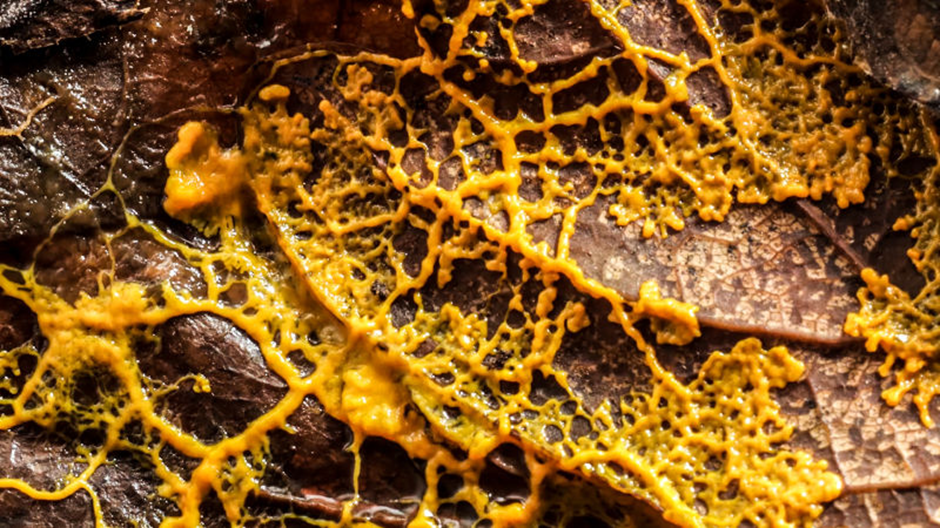
Picture 1 – Physarum polycephalum (Nast, 2019)
03 Tokyo Experiment 2010
Building on knowledge of Physarum polycephalum, a group of researchers led by Atsushi Tero conducted a 2010 study often referred to as the “Tokyo Experiment” (Tero et al., 2010). The research observed how slime mold navigated a layout of 36 food sources representing cities in the Tokyo metropolitan area to form efficient connections.
Initially, the organism spread across the entire available space, exploring multiple possible routes. Over time, it reduced redundant pathways, leaving behind a network of thicker, interconnected tubes linking the “cities.” The resulting topology closely resembled the real-world Tokyo rail network, demonstrating comparable transport efficiency, resilience to disruption, and overall cost.
The experiment was conducted in a Petri dish, where the organism was attracted to nutrients (oat flakes) distributed as nodes to establish direct connections and intermediate junctions. Because the slime mold avoids bright light, researchers used illumination as a repellent to simulate geographical barriers. By projecting a light mask onto the experimental setup, they constrained the organism’s growth to mimic the mountains and lakes that shape the actual rail network.
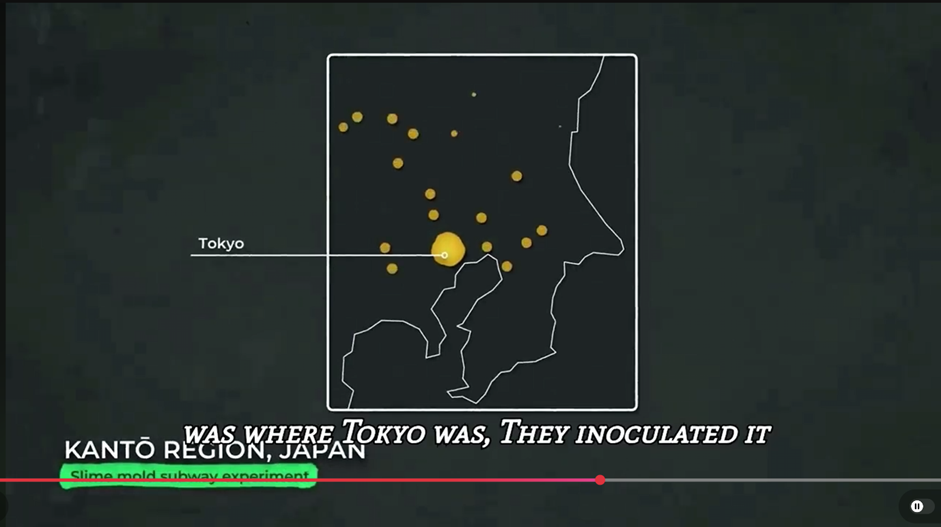
Video 1 – Explanation of Tokyo Experiment (POD SNIPPETS, 2024)
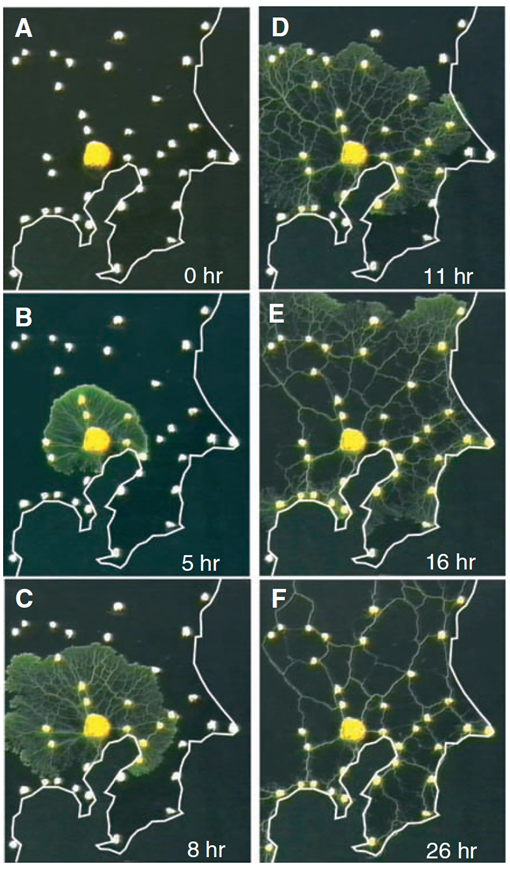
Picture 2 – Network formation in Physarum polycephalum (Tero et al., 2010)
(A) At t = 0, a small plasmodium of Physarum was placed at the location of Tokyo in an experimental arena bounded by the Pacific coastline (white border) and supplemented with additional food sources at each of the major cities in the region(whitedots). The horizontal width of each panel is 17 cm. (B to F) The plasmodium grew out from the initial food source with a contiguous margin and progressively colonized each of the food sources. Behind the growing margin,the spreading mycelium resolved into a network of tubes interconnecting the food sources.
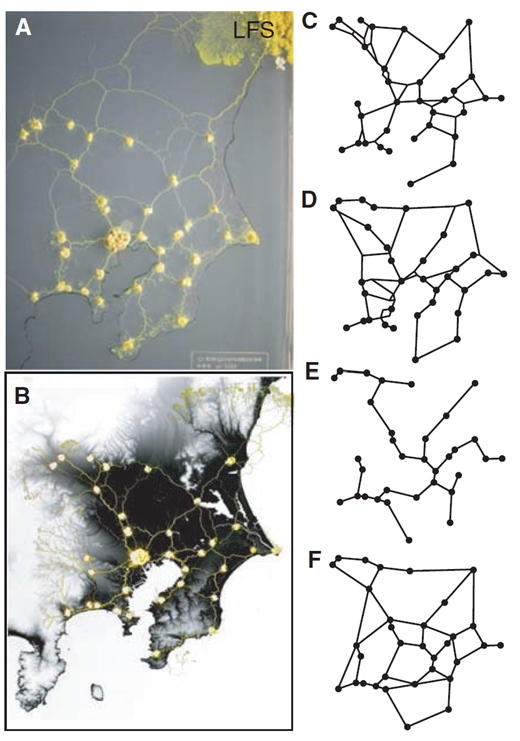
Picture 3 – Comparison between Physarum networks and the Tokyo rail network (Tero et al., 2010)
(A) In the absence of illumination, the Physarum network resulted from even exploration of the available space. (B) Geographical constraints were imposed on the developing Physarum network by means of an illumination mask to restrict growth to more shaded areas corresponding to low-altitude regions. The ocean and inland lakes were also given strong illumination to prevent growth. (C andD) The resulting network (C) was compared with the rail network in the Tokyo area (D). (E and F) The minimum spanning tree (MST) connecting the same set of city nodes (E) and a model network constructed by adding additional links to the MST (F).
04 Translating Physarum polycephalum into digital environment
When I first learned about this experiment, I was so excited that I wanted to recreate it myself. However, the tools necessary to conduct the study for my urban design studio were quite expensive due to international shipping costs. Therefore, I decided to explore this topic within Grasshopper, creating an accessible workflow that allows others to avoid technical scripting hurdles. To demonstrate this approach, the Prague Subway Network was analysed, resulting in the ‘Prague Experiment’.
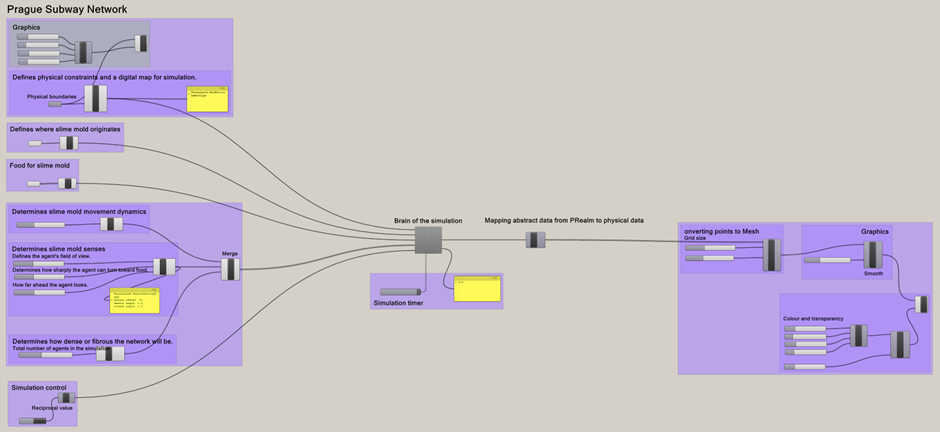
Picture 4 – Grasshopper script for the simulation
05 The main set up
To successfully run the slime mold simulation Physarealm, Anemone, and Kangaroo plugins need to be installed. Firstly, the unit setup in Rhino needs to be considered. Using meters is important because it prevents system crashes by keeping the voxel grid resolution manageable for the Wrap algorithm at an urban scale. Using meters instead of millimetres prevents floating-point errors, those tiny calculation glitches that happen when computers process huge numbers.
Next, the Prague Subway Network map was imported to visualize the primary stations. In this experimental setup, each station was designated as a food attractor. Můstek was selected as the organism’s emitter due to its central location and status as a major transit hub.
To implement this, Point Emitters and Point Food sources were defined and linked to specific coordinates in Rhino (picture 5). To contain the slime mold’s growth, boundaries were established using a Box Environment. Although the simulation is rendered in 2D, it is important to define a 3D Brep (Boundary Representation) which in this case is a 5-meter cube to allow the digital Physarum polycephalum to navigate correctly. This Brep must be set as a surface or volume in Rhino.
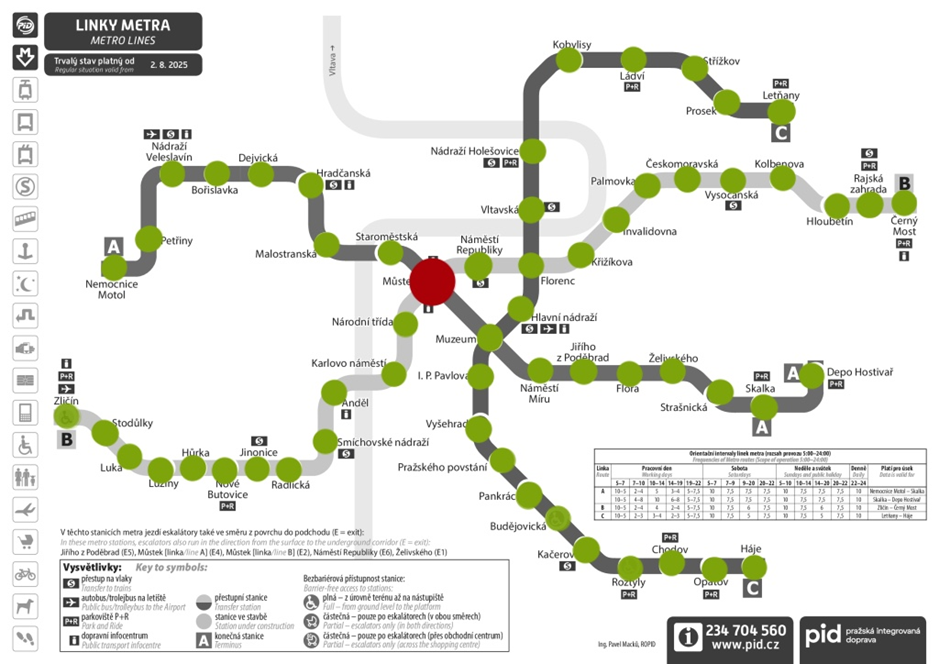
Picture 5 – Prague Metro Network: The red point indicates Můstek, where the Point Emitter is located, while the green points represent the Food Points (original map from Mapa metra Praha, 2019)
All these elements are linked to the simulation’s “brain,” the Physarealm plugin. Finally, to move beyond abstract data and create a physical visualization, the Locations component is used. It essentially acts as a “pen” that draws the scripted paths of the organism (picture 6).
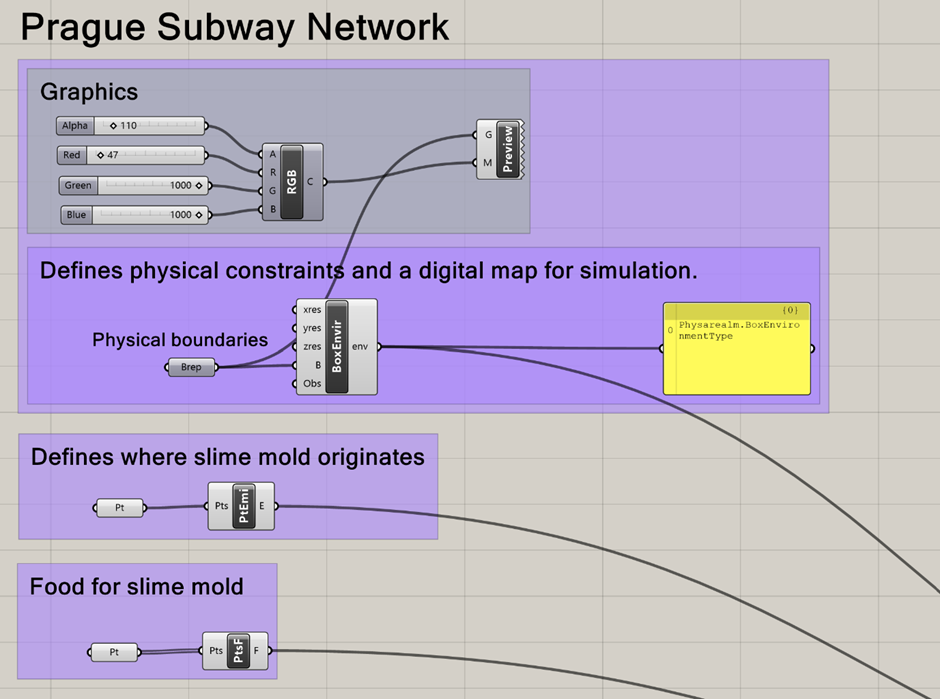
Picture 6 – Main Elements of the Setup in Grasshopper
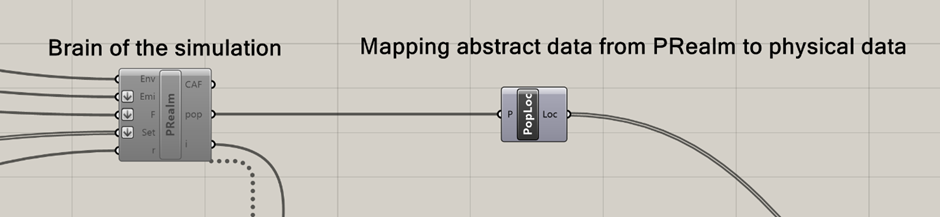
Picture 7 – Brain of the simulation with PRealm in Grasshopper
06 How to efficiently grow Physarum polycephalum?
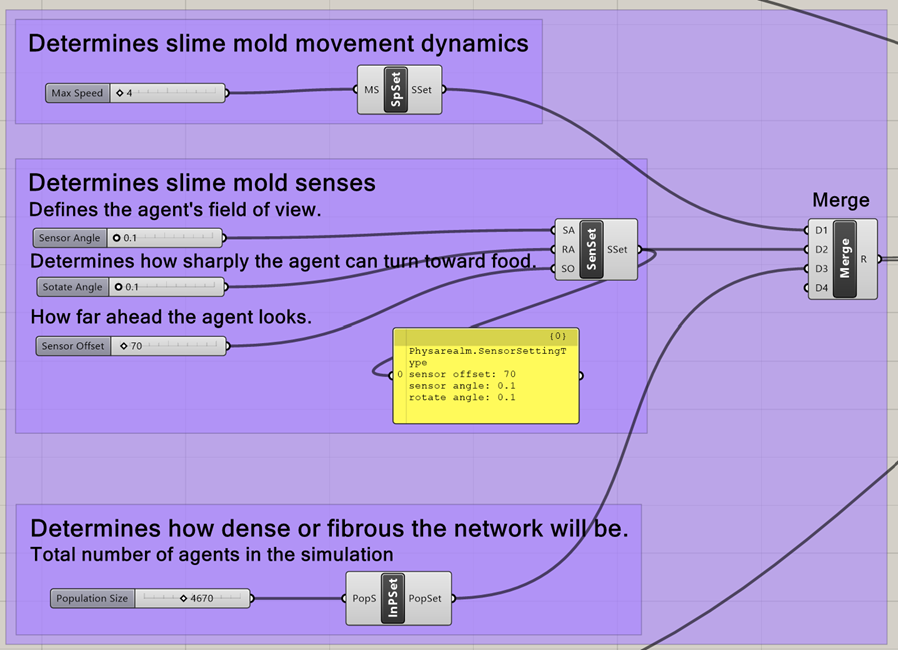
To begin the simulation, it is important to define the parameters for its growth. First is the Speed Setting, which dictates how fast the organism grows. Lower speeds typically result in more intricate, organic paths. In contrast, higher speeds create straighter shortcuts across the site. While a higher Max Speed allows the slime mold to span large distances between metro stations quickly, it can also lead to overshooting targets, which can result in fragmented trajectories.
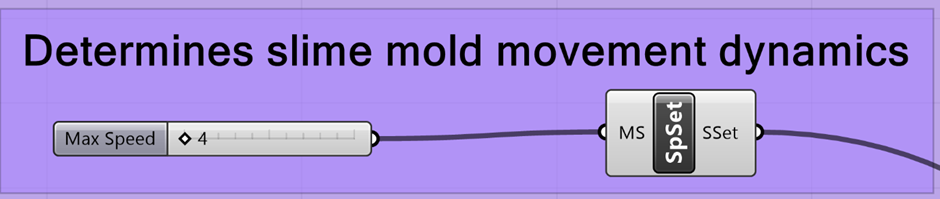
Picture 8 – Speed Setting in Grasshopper
07 How to define the intelligence of Physarum polycephalum?
The Sensory Setting component defines the intelligence and perception of the slime mold agents, determining how they scan the environment and respond to food sources. The Sensor Angle is the first key factor, as it dictates the agent’s field of vision. A low angle leads to rigid, straight paths that often miss nearby data, while a wider angle encourages branching and the creation of a more complex urban web.
The movement is refined by the Rotate Angle and Sensor Offset (SO). The Rotate Angle controls the organism’s agility. Hgher values allow agents to snap quickly toward food, creating the characteristic of biological slime mold. The Sensor Offset represents the “look-ahead” distance. If this is too low, agents can get stuck in local clusters, but if it is too high while the Rotate Angle remains low, agents may detect a station but lack the ability to turn sharply enough to reach it.
Finally, because the simulation is scaled in meters, these settings must reflect the actual geography of Prague. A Sensor Offset of 50, for example, means an agent feels food only 50 meters away. Since metro stations are often kilometres apart, this value must be balanced carefully. If it is too low, the agents will lose the trail and wander aimlessly.
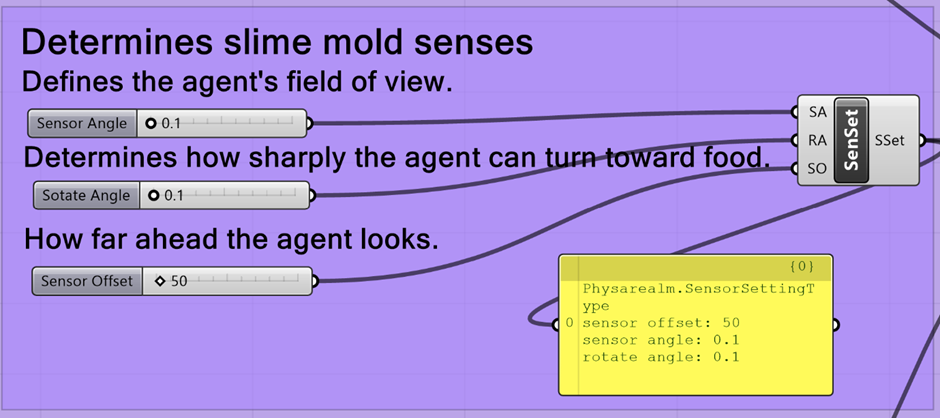
Picture 9 – Sensory Setting in Grasshopper
08 Density and structural integrity of Physarum polycephalum
The Population Size directly influences the density and structural integrity of the digital slime mold by determining the total number of agents navigating the environment simultaneously. A higher population creates a denser, more cohesive network, whereas a low population results in thin, isolated filaments that may fail to form connections.
In urban design terms, a higher agent population simulates the emergence of alternative routes. The more agents that pass through a specific area, the stronger and more prominent that trajectory becomes in the final mesh. However, it is important to know that if the population is too high, the slime mold may merge into a single solid mass. This causes the simulation to lose the intricate, filamentous structure central to the project. If the output begins to resemble a blob rather than a network, lowering the population while slightly increasing sensor parameters can help maintain connectivity without sacrificing detail.
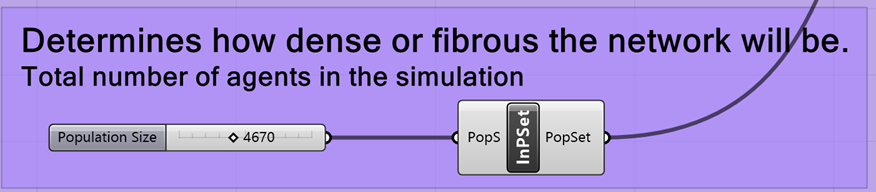
Picture 10 – Population Size in Grasshopper
Picture 11 – Population Size, Sensory Setting and Speed Setting in Grasshopper connected
09 How to time the simulation of Physarum polycephalum?
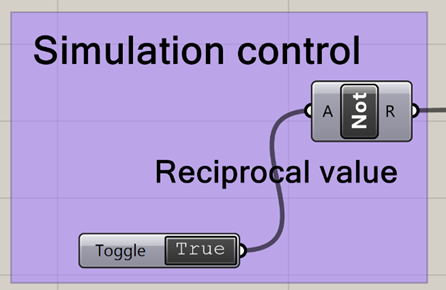
Simulation Control manages how the organism starts, stops, and progresses through time. The “Not” component was used because the simulation logic was a bit flipped. Basically, the “Reset” input on the simulation brain needs a False signal to actually start running. If it receives a True signal, it just stays in reset mode and nothing happens. By adding the “Not” gate, I was able to invert the signal. This means that when the toggle was withced to True, the gate flips it to False, which tells the simulation not to reset. It makes the whole setup much more intuitive to use, since “True” now actually means “Go” and “False” means “Stop.”
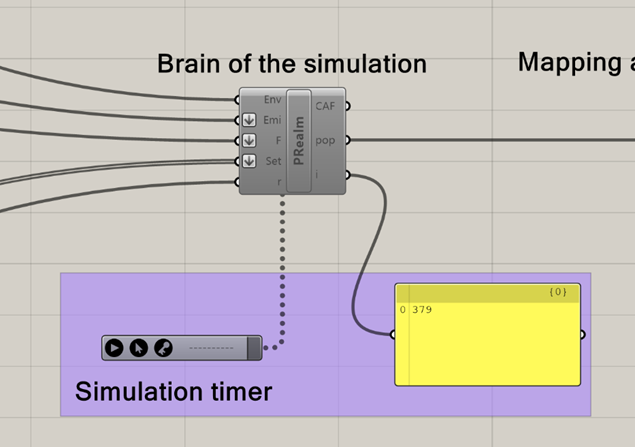
The Timer is the heartbeat of the system. Because digital slime mold grows iteratively rather than appearing all at once, the Timer tells Grasshopper to refresh the calculation at specific intervals, such as every 20 milliseconds. Every time the Timer “ticks,” the agents move a fraction further based on your defined Max Speed and Sensor Settings. Without this constant refresh, the organism would remain a static set of points rather than move dynamically across the Prague metro map.
Managing this control system is also key to handling computer performance. If the simulation movement becomes rusty or lags, increasing the Timer interval (for example, to 100ms) will make the simulation move slower but keep the software more responsive. Additionally, when changing major settings like Population Size, toggling the simulation off and on again allows the agents to respawn with the new logic.
Picture 12 – Simulation control in Grasshopper
Picture 13 – Timer in Grasshopper
10 How to change point into a solid Physarum polycephalum?
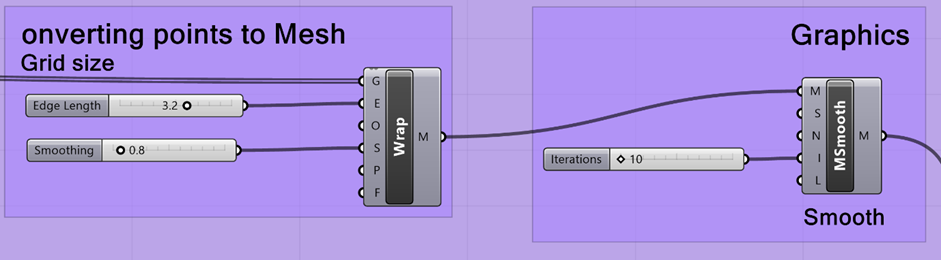
This section of the script transforms abstract agent data into a physical, 3D organic form. The Wrap Component (Voxelization) creates a digital skin around the points generated by the agents. The Edge Length (E) setting defines the grid resolution. Sometimes when the value is set the grid can be relatively coarse, which keeps the simulation fast but can result in a rigid appearance. To counter this, the internal Smoothing (S) within the Wrap component helps the initial voxel mesh look like a soft, continuous volume rather than a collection of cubes.
Further enhancement is handled by the MSmooth Component (Laplacian Smoothing), which help the mesh to resemble real biological tissue. This is controlled by Strength (S), and Iterations (I). The iterations determine how many times the smoothing calculation is repeated. Low values keep the mesh closer to the original bumpy agent paths, while high values make the mesh sleek. If the iterations are pushed too high, the form eventually shrinks into thin wires.
Mastering the relationship between Edge Length and Iterations is essential to the final visual of the slime mold. If the Edge Length is high, 20–30 iterations would be needed to hide the blockiness. However, if holes appear in the slime mold, it usually means the Edge Length is too large for the diameter of the filaments and should be lowered for more detail. By balancing these four sliders, you can decide whether the urban network looks like a heavy, muscular system or a light, delicate web of silk.
Picture 14 – The Wrap Component and MSmooth Component in Grasshopper
11 How to change the graphics to look like Physarum polycephalum?
This final stage of the script is where the digital mesh is given its visual identity, moving the project away from a default CAD appearance toward a realistic, biological representation. The RGB component defines the base hue, while the Alpha slider allow the simulation to have organic visuals. By setting the Alpha to 71 %, the slime mold becomes semi-transparent. This is crucial as it allows the viewer to see the underlying city map and metro lines through the organism. Furthermore, transparency softens the edges of the mesh, effectively hiding any minor voxel rustiness from the previous steps.
The Shine slider (connected to the S input of the Material) controls how light reflects off the surface. A high shine value creates a wet appearance. Since slime molds are moist living organisms, sharp specular highlights make the material look organic and alive rather than like dry plastic. The Custom Preview component is what ultimately displays the result in the Rhino viewport. For the best visual result, it is important to disable the preview on all previous components like Wrap and MSmooth. If left on, the default red/green Grasshopper preview will overlap with the custom material, making the result look muddy or glitchy.
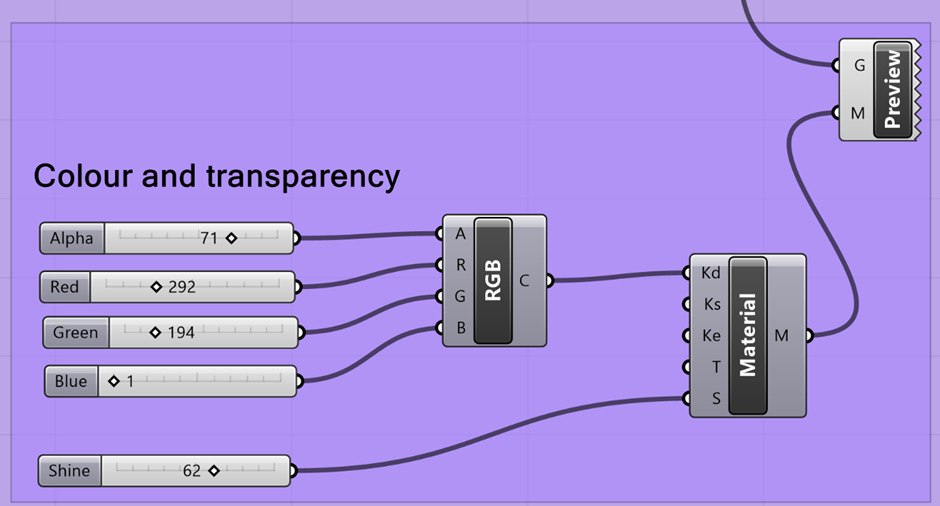
Picture 15 – The RGB component and Material Component in Grasshopper
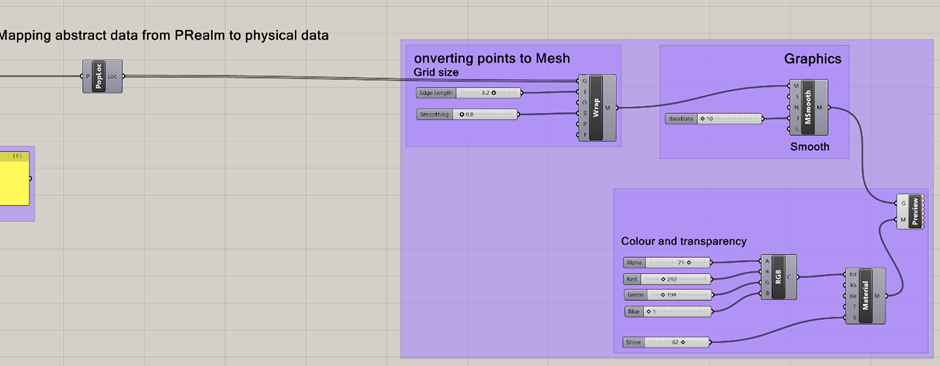
Picture 16 – Connecting components in Grasshopper
12 Prague Subway Network
The experiment demonstrated several compelling potential connections for the Prague Metro network. Although some of these routes are longer, they could contribute to a more efficient overall transportation system for passengers. As shown in Figure 17, where the metro map is overlaid with the simulation results, notable similarities can be observed between the existing network and the simulated patterns.
The simulation also identified Palmovka and Smíchovské nádraží as potential transfer stations to enhance network connectivity. It is important to note, however, that this experiment was significantly simplified. For future iterations, the simulation could place “food attractors” not only at current station locations but also in areas based on population density and urban development. This would help identify the most effective connections for the city’s evolving needs.
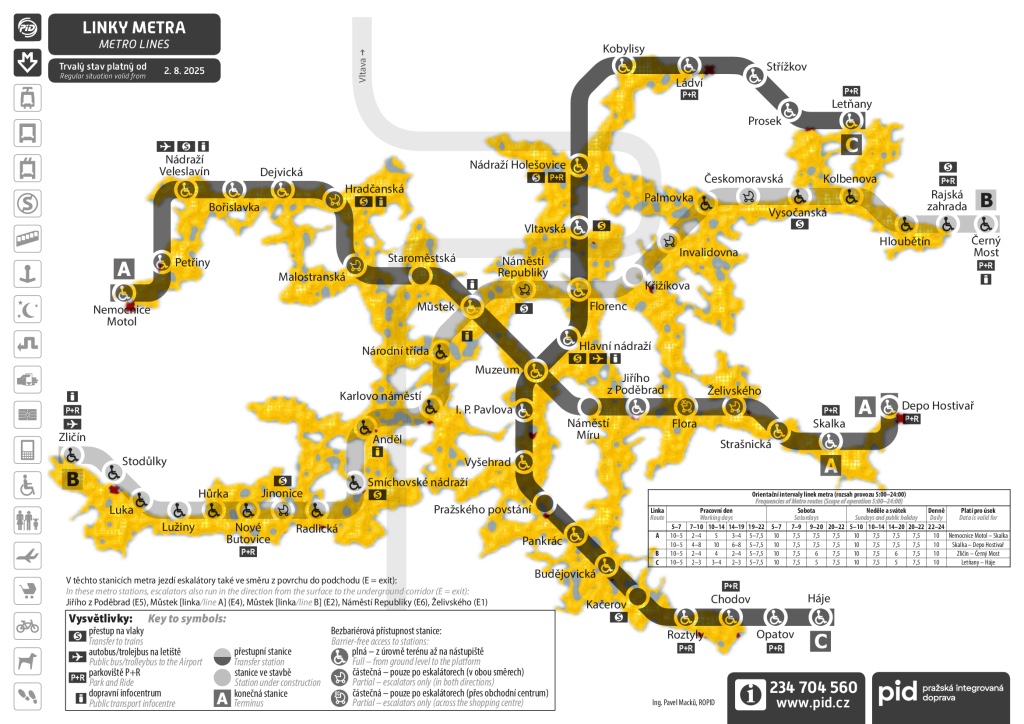
Picture 17 – Sime mold simulation results for Prague Metro Network in Grasshopper
Video 2 – Sime mold simulation for Prague Metro Network in Grasshopper
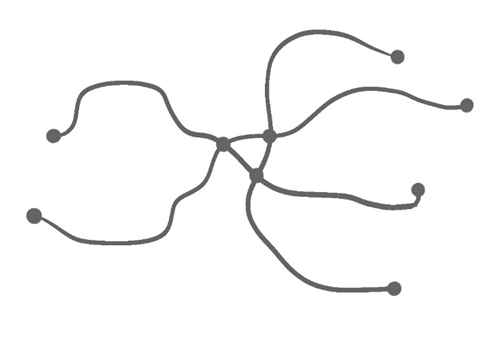
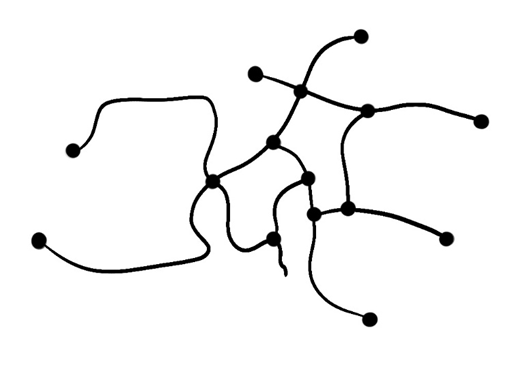
Picture 18 – Diagram of Prague Metro Network connections
Picture 19 – Diagram of Slime mold simulation connections
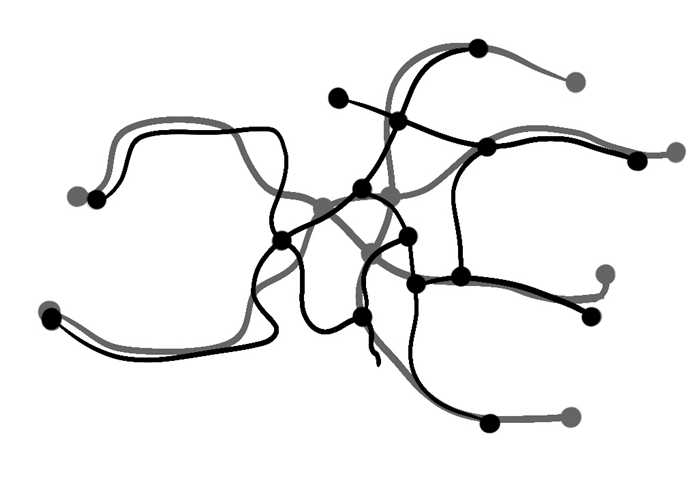
Picture 20 – Comparison of the results. In grey is a diagram of the Prague Metro Network connections, whereas in black is the diagram of the slime mold simulation connections.
13 How it can be implemented into urban design?
To demonstrate the further potential of this simulation, the workflow was applied to the district of Braník. In this setup, attractors were placed at tram and train stations, while food sources were located at key residential and commercial buildings. By using the Obstacles tool, building footprints were defined as physical barriers, forcing the slime mold to navigate around the built environment rather than going through it.
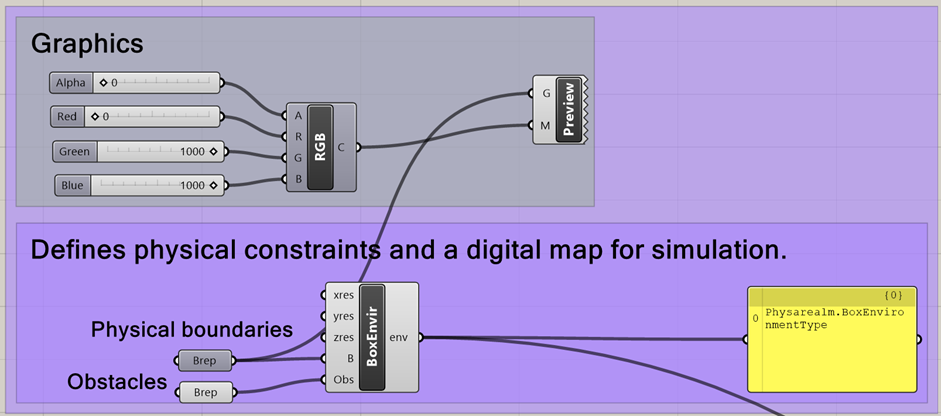
Picture 22 – Obstacles added to the simulation to mimic the buildings in Grasshopper.
Hence, this simulation can help to demonstrate the possible urban connectivity and optimize pedestrian paths between housing and transit hubs (picture 23). By simulating the natural, efficiency-seeking growth of the organism, the simulation identifies the most logical walking routes and potential shortcuts within the district.
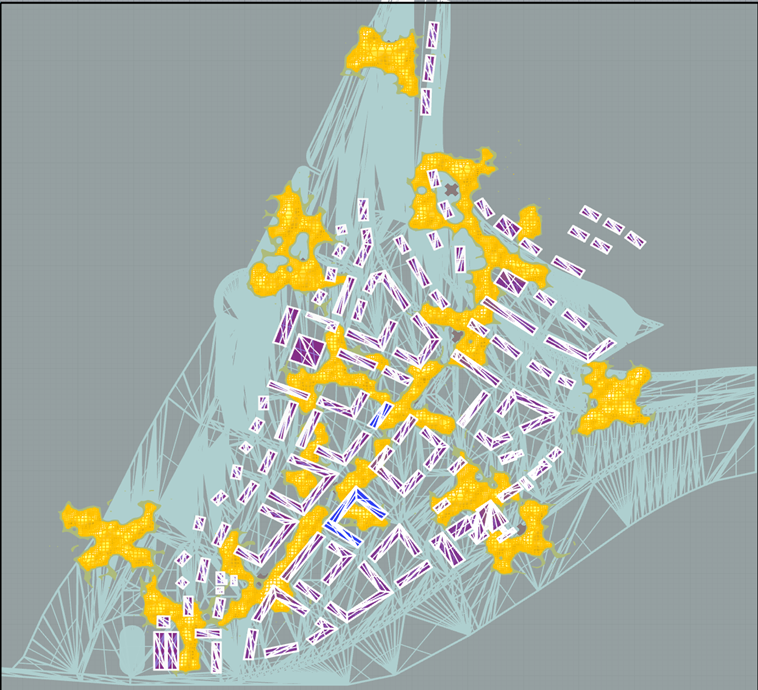
Picture 23 – Using slime mold in urban design in Grasshopper
14 Conclusion
In conclusion, integrating Grasshopper into the design workflow provides a practical and efficient way to explore and test urban design ideas. When the simulation parameters are carefully adjusted, it can become a powerful tool for improving and optimizing the design process. While this study focuses on larger systems such as metro networks, the same method can also be applied at smaller urban scales to strengthen connections and support spatial development. Since the digital slime mold behaves like a living organism searching for the most efficient paths, it can evaluate, understand, and refine complex urban design proposals.
15 Plugins
- Physarealm – https://www.food4rhino.com/en/app/physarealm,
- Anemone – https://www.food4rhino.com/en/app/anemone,
- and Kangaroo – (natively part of Rhino since version 7)
16 References
- Mapa metra Praha (2019). Mapa metra Praha – trasy, stanice. [online] Mapametra.cz. Available at: https://www.mapametra.cz/ [Accessed 9 May 2026].
- Nast, C. (2019). Mycologist Explains How a Slime Mold Can Solve Mazes. [online] Wired. Available at: https://www.wired.com/video/watch/mycologist-explains-how-a-slime-mold-can-solve-mazes.
- Oettmeier, C., Fessel, A. and Hans-Günther Döbereiner (2021). Integrated biology of Physarum polycephalum: cell biology, biophysics, and behavior of plasmodial networks. Elsevier eBooks, [online] 3(1), pp.453–492. doi:https://doi.org/10.1016/b978-0-12-824281-0.00004-x.
- POD SNIPPETS (2024). Did Slime Mold, An Amoeba Designed the Japanese Subway System??? [online] YouTube. Available at: https://www.youtube.com/watch?v=toTg-vE0uY0 [Accessed 9 May 2026].
- Tero, A., Takagi, S., Saigusa, T., Ito, K., Bebber, D.P., Fricker, M.D., Yumiki, K., Kobayashi, R. and Nakagaki, T. (2010). Rules for Biologically Inspired Adaptive Network Design.
17 Files